


MANAGE ONLINE

MANAGE ONLINE
ALLDATA Manage Online gives you everything you need to run your business. Quickly create estimates, repair orders, and invoices, order parts online from industry-leading vendors, run essential business management reports, perform digital vehicle inspections with integrated ALLDATA Inspections, and stay in touch with your customers with a built-in Customer Relationship Manager (CRM).

Now integrated with ALLDATA Manage Online, new ALLDATA Inspections* lets you jumpstart the check-in process on your mobile phone or tablet while seamlessly connecting inspections to estimates, repair orders, and more. Greet customers at the vehicle, easily look up or add a new customer, quickly check off a digital inspection sheet, and email it for approval – all in minutes.
*Requires subscription to ALLDATA REPAIR or ALLDATA COLLISION and ALLDATA MOBILE
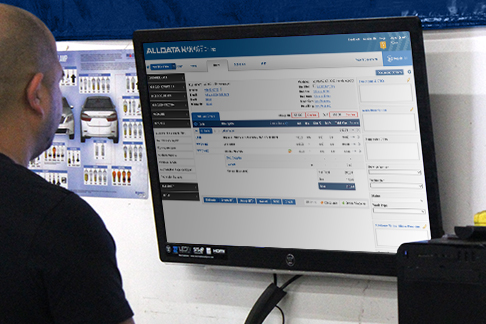
ALLDATA Manage Online offers expanded features for comprehensive shop management. It’s an excellent tool for shops – especially growing and multi-shop operators – with the ability to perform extensive business reporting, a built-in customer relationship manager (CRM) and more. Plus, you can access the entire program anywhere, anytime - so you can work where you want, when you want. It even comes with automatic updates!

Cloud Platform – Access anywhere; automatic updates and backups
In-Product Guidance – Follow step-by-step instructions for easy set up and reduced training time
VIN Tools - Look up a customer/vehicle from a partial VIN; pull up the VIN from the license plate
DTC Lookup – Define, save, and print DTCs on the work document
Job Groupings - Group parts and labor into jobs on the printed or emailed Estimate, Repair Order or Invoice

Deferred Work – Track suggested jobs and deferral reasons; set up reminder notifications
Customer Relationship Manager – Send reminders/promotions by text or email; track customer source; analyze marketing results; can also integrate with DemandForce™ or MechanicNET™
myCARFAX Integration – Access myCARFAX Service History Check; add service records to myCARFAX


- Custom Jobs – Build and search custom jobs; link jobs to integrated parts catalogs; set specific tax codes per job
- Vendor-Specific Price Matrix - Assign specific markup prices to each vendor
- Flexible Tax Setup – Choose specific tax rates for each tax code; works with Canadian tax codes
- Work In Progress Screen – View the status of all work at a glance; customize views by user/station
- Built-in customer relationship manager - send job notifications & promotions via text or email
- Credit Card Integration – Process card payments online
- Technician Cost & Time Tracking – Compare estimated vs. actual time spent on jobs; analyze wage efficiency
- Service Writer Report - Find repair orders and totals by Service Writer to measure performance
- Financial Reports – Access the reports necessary to run your shop; assess costs and profitability
Quickly order parts by accessing electronic parts catalogs for vendors all over the country, then add parts to your estimates. Manage Online connects with local parts vendors through these catalogs:
- AutoZone®
- WHI/Nexpart
- Transtar Industries®
- OEM Parts & Labor
- MCSM
- IAP (Internet Auto Parts)
- FederatedAutoi
- TurboParts® (DST)

Export information from Manage Online to QuickBooks Desktop, or integrate directly with QuickBooks® Online.

Look up the complete 17-digit VIN from a license plate. Get access to exclusive myCARFAX service history reports.

Securely process customer payments.

Integrate with MechanicNet to create a website, send customer messages and reminders, and manage social media.

Integrate your customer database with Intuit® Demandforce®, an automated marketing service for small businesses.

Transfer customer information, invoices, appointments and deferred work data from Manage Online to Kukui.
Whatever your needs, we have a shop management solution that fits

ESTIMATOR
$0.00
/Month

SHOP MANAGER
$99.00
/Month
SHOP MANAGER PRO
$259.00
/Month
*Requires subscription to ALLDATA REPAIR or ALLDATA COLLISION, ALLDATA INSPECTIONS and ALLDATA MOBILE.
MANAGE ONLINE
$329.00
/Month

Recommended Products

REPAIR
$209.00
/Month

COLLISION
$249.00
/Month
MOBILE
$39.00
/Month
PRODUCT SUPPORT
What’s New, How-To Docs & More
Visit the Support Page for ALLDATA Manage Online

NEED MORE INFORMATION?
Not sure which products are best for your shop? Just complete the form to request more information, schedule a demo, or talk with a representative. We’ll make sure you get you the resources you need to make an informed decision.
FAQs
Our shop management systems were created with shops of all sizes in mind. ALLDATA Estimator is best for smaller shops that are mostly concerned with providing professional estimates for customers. ALLDATA Shop Manager is best for small-to-medium shops that need the essentials, like creating estimates, repair orders, invoices, parts ordering, and basic sales/tax reports. ALLDATA Manage Online is best for larger shops looking for expanded features like managing parts inventory, tracking techs’ time and cost, detailed reports, built-in customer relationship manager (CRM), and customer communications (email/text). It also offers integrations with QuickBooks, Worldpay, KUKUI, Demandforce, Twilio, Mechanic Net and myCARFAX.
Yes, ALLDATA offers database conversions when switching from most other shop management systems. You can reach out to your Account Manager for more assistance.
Most features come with the system at no additional charge. The only add-on through ALLDATA is ALLDATA Inspections for digital vehicle inspections, which is accessed from the ALLDATA Mobile app.
Manage Online also works with these popular business solutions, which require their own subscription or purchase: QuickBooks, Worldpay, KUKUI, Demandforce, Twilio, and Mechanic Net.
This product is extremely robust and requires a demonstration from a Business Solutions Manager to ensure that it is the best fit for your business.