


REPAIR PLANNER

REPAIR PLANNER
ALLDATA Repair Planner is a timesaving tool that works with the three major estimating systems and integrates seamlessly with ALLDATA Collision’s repair platform. Repair Planner reviews your estimate line-by-line and alerts you to OEM-required procedures so you can limit liability and accurately plan necessary inspections and repairs.


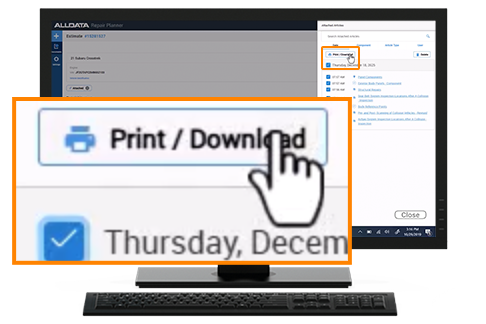
- Attach all relevant OE procedures associated with a repair job into a single printable, downloadable document.
- Attach OEM Repair articles directly to estimates and access critical procedures without leaving Repair Planner.
- Track all viewed OEM repair articles, including article details, user, and time stamps, to maintain clear visibility into research activity, improve estimate completeness, and reduce supplements and comebacks.
- Auto-analyze estimate to identify commonly required line items that may be missing.
- Upload estimates written in French directly into Repair Planner with line items mapping to repair information.
Repair Planner integrates with ALLDATA Collision and displays everything you need for safe and factory-accurate repairs, including:
- OEM Alerts – Line by line, red OEM Alerts ensure you’re repairing vehicles back to factory specifications.
- OEM Procedures – Graphic icons indicate OEM information in ALLDATA Collision associated with a particular job, including TSBs, DTCs, service precautions, specifications, diagrams, paint codes, locations, and more.
- Vital Repairs – Describes the OEM-specified inspections and repairs required after a collision, including high voltage system disable/enable.
Repair Planner is now available on CCC Secure Share™ network so users can import their estimates automatically. Users can also import estimates manually from a local device for other estimating systems.
ALLDATA Repair Planner reviews your estimate in seconds, flagging OEM-specified structural repairs line-by-line.
Provides direct links to step-by-step procedures, required inspections, manufacturer position statements, ADAS information, TSBs, DTCs, diagrams, and more.
Calls out critical OEM procedures line-by-line, making sure that your customers get the repairs recommended by the manufacturer’s own criteria. Detailed documentation protects your shop and streamlines insurance claims.
PRODUCT SUPPORT
What’s New, How-To Docs & More
Visit the Support Page for ALLDATA Repair Planner
