


ALLDATA Upgrades Flagship Products
Help Your Shop Work Smarter and Faster with ALLDATA’s Two New Powerful Enhancements
In today’s fast-paced automotive repair industry, efficiency isn’t just a goal—it’s a necessity. Every minute saved in the shop translates to improved productivity, happier customers, and a healthier bottom line. That’s why ALLDATA continues to invest in tools and features designed to streamline your workflow and give your technicians the information they need—fast.
ALLDATA is excited to introduce two major enhancements that will help your shop work smarter than ever:
- Specifications Quick Reference: Get critical vehicle specs in seconds.
- ALLDATA Estimator: Build professional estimates seamlessly within ALLDATA Repair® and ALLDATA Collision®.
1. Specifications Quick Reference: Fast Access to the Specs You Use Most
When you’re in the middle of a repair, time spent searching for specs is time lost. Whether it’s torque values, fluid capacities, or brake measurements, technicians need quick and reliable access to OEM specs without having to dig through multiple screens.
That’s where Specifications Quick Reference comes in. This new feature organizes the most-used OEM specifications in one convenient location: inside ALLDATA Repair and ALLDATA Collision.
How It Works
After selecting a vehicle, simply navigate to the Information column. There, you’ll find a streamlined list of critical specs your technicians need most—organized for speed and accuracy.
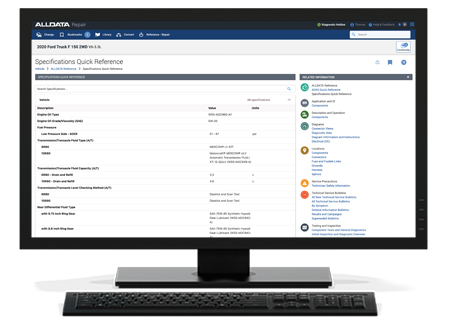
What You Can Do with Specifications Quick Reference
- Check brake bleeding sequences, rotor thickness, runout, and variation
- Confirm axle nut torque, ball joint wear specs, and lug nut torque
- Look up oil drain plug torque, fuel filter location, and fuel pressure specifications
- Quickly reference fluid types and capacities for engine oil, brake, clutch, coolant, differential, transfer case, and transmission
ALLDATA continues to add more specifications weekly, so you have the latest information at your fingertips. No more flipping through multiple pages or guessing at values. With Specifications Quick Reference, your team gets the right information fast, so they can stay focused on the job.
2. ALLDATA Estimator: Professional Estimates Without the Hassle
Creating accurate, compliant estimates has always been a critical part of running a successful shop. But traditional estimating processes often involve duplicate data entry, manual lookups, and time-consuming guesswork. That’s why we’ve integrated ALLDATA Estimator directly into ALLDATA Repair and ALLDATA Collision—at no extra cost.
Why It Matters
ALLDATA Estimator uses parts and labor sourced from ALLDATA’s OEM repair information, ensuring your estimates are accurate and aligned with real-world workflows. And because it’s built into the platforms you already use, you can move seamlessly between repair information and your estimate without switching tools.
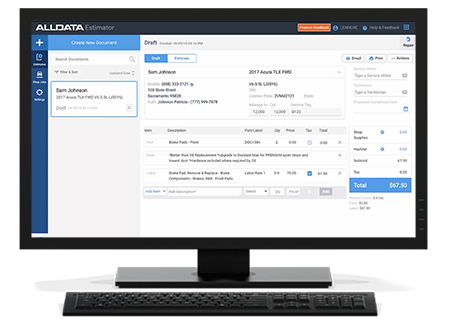
Key Benefits
- Create professional, compliant estimates using OEM parts and labor directly from ALLDATA
- Move seamlessly between repair procedures and your estimate
- Reduce manual entry and eliminate guesswork
- Order parts directly from the AutoZone catalog*
- Keep estimating and repair workflows connected for maximum efficiency
By reducing friction in the estimating process, ALLDATA Estimator helps you save time, improve accuracy, and deliver better service to your customers—all without leaving the ALLDATA environment.
One of the best benefits of having Estimator integrated into ALLDATA Repair and Collision is the ability to order parts directly from the AutoZone Parts Catalog* with your AutoZone PIN. If you don't have an AutoZone PIN, you can easily get one by calling (866) 853-6459.
Once you have your PIN, enter the number in Estimator to link the shop’s AutoZone commercial account with the AutoZone Parts Catalog. This one-time step will enable real-time pricing availability and order tracking.
Once you’ve linked your AutoZone PIN, you can punch out to the AutoZone Parts Catalog where you can find the right aftermarket parts in real-time without guesswork or phone calls. Once the part arrives, mark it “received” in Estimator for a seamless workflow.
For more information about Estimator and the parts ordering process, please view the Estimator video below.
*Available in U.S. only
Why These Updates Are a Gamechanger for Your Shop
Both of these enhancements were designed with one goal in mind: to help your shop work more efficiently and profitably.
- Specifications Quick Reference eliminates wasted time searching for specs.
- ALLDATA Estimator streamlines the estimating process and keeps everything connected.
Together, they represent ALLDATA’s ongoing commitment to providing smarter tools that deliver more value to your business.
Ready to See These Enhancements in Action?
Log in to ALLDATA today and explore these powerful new features. Not a subscriber? Try a free trial.
Want to see how ALLDATA can improve shop efficiency? Check out our suite of products, each designed to contribute to both shop efficiency and productivity.
If you would like to read more articles like this one please subscribe to ALLDATA News.
