


Everything you need to know about using Shop Manager Pro, Shop Manager and Estimator
If this is not the product you are looking for, please select from the following:
Getting Started
Learn how to set up Shop Manager / Estimator
See the latest product features and updates
Compare the differences between Shop Manager and Estimator
How to Use
Self-help articles covering a variety of topics
Get a quick look at ALLDATA Shop Manager in action
Frequently Asked Questions
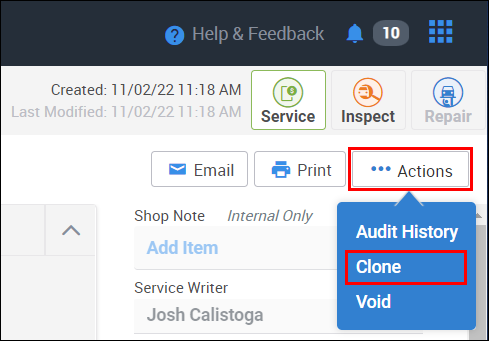
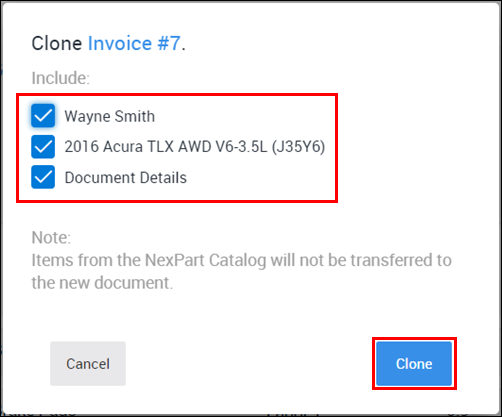
Clone a document to create a copy of an existing estimate, RO, or Invoice. You may choose to carry over customer, vehicle and line items to the new Document.
- From the Documents screen, click ... Actions >> Clone.
- Select the items you want include on your cloned document >> click Clone.
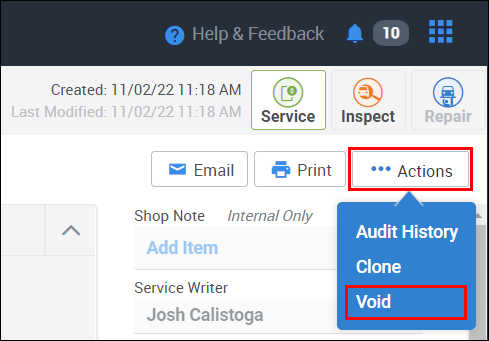
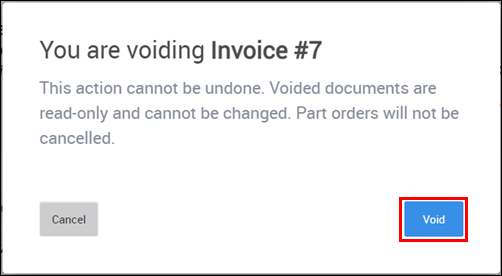
Only documents in Draft status can be deleted. All other document types are permanent and can only be voided.
From the Documents screen, click ... Actions >> Delete / Void.
- Click Void on the confirmation popup.
View the document's audit history in order see the changes that have been made over time.
- From the Documents screen, click ... Actions >> Audit History.
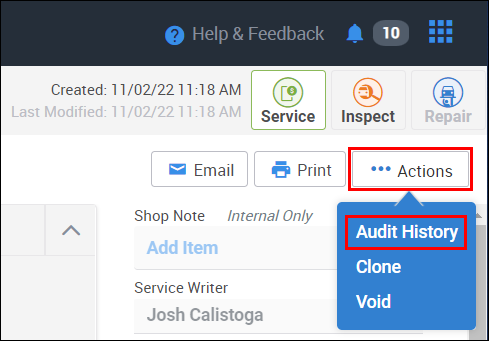
- The audit History Screen will display.
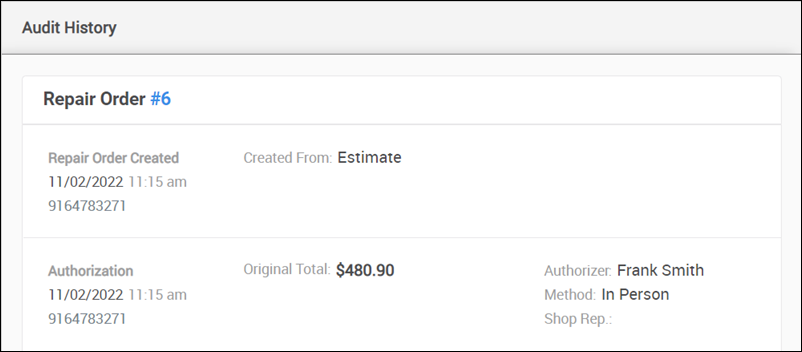
- The audit History Screen will display.
Job Group
Creating a Job Group will allow you to group together all required parts, labor, notes, etc., for a specific repair procedure in order to separate items used for different repair procedures on the same work document. (Example: A Job Group labeled "Brake Job" might include part items such as: brake pads, rotors, drums, shoes, etc.; labor cost; or notes that include wear observations, etc.)
Shop Job
A Shop Job is a commonly used Job Group that has been prebuilt and saved in order to quickly add it to a new work document so you don't have to add each individual line item every time you work a similar job.
Yes.
Shop Manager includes all the necessary tools to meet the state of Florida's document requirements. For information about how to set up Shop Manager and what needs to be included on each document, please see Florida Document Requirements.
Shop Manager DOES NOT have a specific way of calculating or applying CAT.
CAT was created as a tax on the business and was not intended to directly tax the consumer. Businesses can indirectly pass the cost of the tax onto the consumer through increased prices of goods and services offered. For more information about CAT, who it affects, how it is applied, etc., please view the following CAT information page available from the state of Oregon https://www.oregon.gov/dor/programs/businesses/pages/corporate-activity-tax.aspx
Shop Manager Pro FAQ's
Yes, we are working on a solution to add more quantity types to better track inventory stock. For instance, when adding 6 gallons of bulk oil as a "box", you cannot currently break that down into "gallons" or "quarts", etc.
Not currently
No
No
Not at this time.
Yes, you can view/print the Inventory report.
Not currently
Yes 100mb video, 25mb photos
Yes-25 images/10 videos/5 PDFs
Yes, they get compressed after the upload.
No you cannot text photos or videos. We only support SMS at this time.
The registration process has strict requirements mandated by the mobile carriers that apply to all text-messaging service providers. An ALLDATA representative will help you through the registration process once you have gathered the necessary requirements.
Requirements Checklist
- Tax ID / EIN
- This is the company name as it exists on all legal documents (e.g. tax returns, incorporation documents, etc.).
- Company Address
- This is the address as it exists on all legal documents for the company.
- Business Email Address
- Web Site URL
- Company Opt-In Policy
- This policy must describe the details of how your shop gathers and records consent from your customers.
- This policy must be posted on your website and be accessible via a specific URL.
- This information cannot be displayed via a pop-up message on the website; it must be its own web page within the website.
- Company Privacy Policy
- This policy must be posted on your website and be accessible via a specific URL.
- This information cannot be displayed via a pop-up message on the website; it must be its own web page within the website.
- Company Terms & Conditions
- This policy must be posted on your website and be accessible via a specific URL.
- This information cannot be displayed via a pop-up message on the website; it must be its own web page within the website.
- Use digital intake forms or client portals to capture opt-in.
- Include opt-in prompts during appointment booking or service check-in.
- Train staff to explain texting benefits and confirm consent verbally and digitally.
- Regularly audit opt-in records to ensure compliance.
Yes, the customer will need to call or text the shop and either request for a new authorization link if they want to do it on the portal or communicate their decision to the shop via the call or text.
Yes, the system keeps record in the messages tab of Shop Manager Pro on the left. Text conversations are tied to a document, so the history of conversation lives with the document. You also have the option to print the conversation.
Texting is included with your Shop Manager Pro subscription. You pay nothing extra for the texting option.
Yes, you may send or receive up to 4000 total per month. There is not an option to purchase more at this time.
No, they cannot be deleted. Since the messages are stored in the cloud, it will not impact the storage of the device.
No, texting is optional.
Yes, they will need to opt in through your website/social media page. This cannot be done within Shop Manager Pro.
They are static (not customizable). Some of them allow additional filtering options such as by tech/service writer, etc.
Technician times can be modified while the document is still in RO status. Any changes made at that time will reflect in reports once the document is finalized as an Invoice. At that point, no further modifications can be made including additional adjustments to technician time tracking.
Technician view is not currently available, but is actively being worked on.
Yes, these will be available based on the tech's role and permissions settings.
No, They are only for reference for the Service Writer or the Tech.
No, They are only for reference for the Service Writer or the Tech.
Yes, in settings.
Yes, you can slide it on in the "Add On" area of settings
Yes, you can clone an existing document by clicking the Actions button. That will create a new draft with all the line items carrying over from the previous document. You will have to remove any extra line items.
Not at this time. This feature may be available in a future Shop Manager subscription tier.